
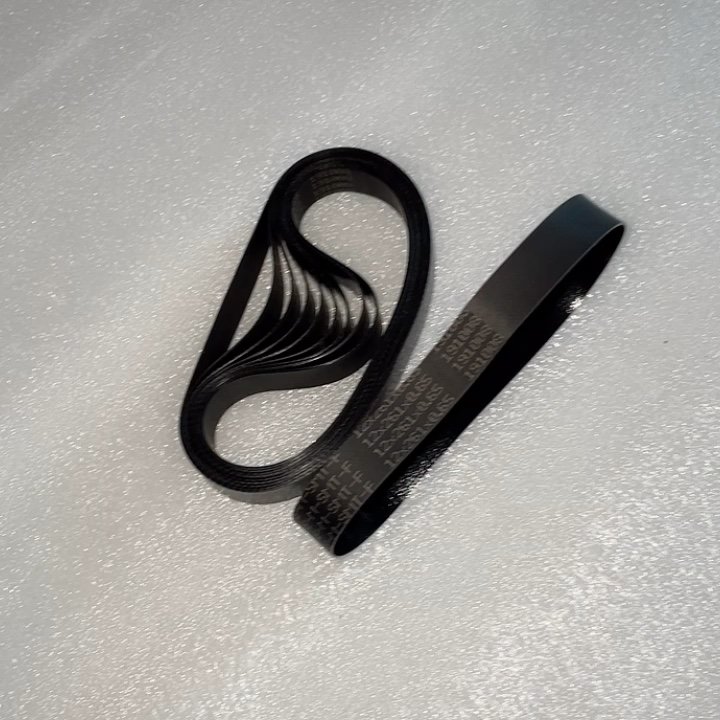
A quality belt for laser machine is one of the most important parts of your setup. Most people overlook it until something goes wrong. Your belt controls how the laser head moves across the work surface. If it fails, your cuts go off track, your designs shift, and your output suffers.
At Redsail, we work with laser operators every day. We know how much a worn or poor belt can cost you in time and materials. This guide will help you spot the warning signs early.
Your Cuts Are No Longer Clean or Straight
One of the first signs of a failing drive belt is uneven cuts. You may notice your laser cutting machine leaving jagged edges. Lines that should be straight start to curve or drift slightly. This often means the belt has stretched or developed loose spots.
What Uneven Cuts Look Like
- Cut lines shift slightly between passes
- Engraving depth varies across the same piece
- Straight lines appear wavy on one side
When you spot these problems, check belt tension first. A belt that is too loose cannot hold the carriage in place. Even a small amount of slack causes big accuracy issues.
How Belt Stretch Affects Your Work
Over time, belts stretch from heat and repeated motion. A stretched belt skips teeth on the pulley. This breaks the sync between your machine’s motor and the laser head. You lose precision and that costs you materials and time.
You Hear Strange Noises During Operation
Unusual sounds are a clear warning from your machine. A healthy drive belt runs quietly and smoothly. If you hear clicking, slapping, or squeaking, something is off.
Common Sounds That Signal Belt Trouble
Slapping noise the belt is too loose and hitting the frame. Clicking sound belt teeth are skipping over the pulley. Squeaking the belt surface is dry, cracked, or worn.
These sounds are easy to ignore at first. But they often get worse fast if you don’t act. Replacing the belt early saves you from a full breakdown later.
Don’t Confuse Belt Noise With Motor Noise
Sometimes people blame the motor when the belt is the real issue. A simple test: loosen the belt tension slightly. If the noise goes away, the belt was too tight. If the noise stays, inspect the belt surface for cracks or tears.
Your Machine Keeps Losing Its Home Position
Does your laser head drift from its starting point? This is one of the clearest signs of a worn transmission belt. The home position is where the machine resets before every job. If the belt slips, the machine loses track of where it started.
Why Home Position Errors Are Serious
When your machine loses home position, every job after that is off. Your cuts don’t align with your design. Multi-pass engraving lines don’t overlap correctly. You waste time re-aligning and re-running jobs.
How to Test for This Problem
Run the same simple pattern three times in a row. Compare all three results side by side. If the positions shift between runs, your belt needs attention. It could be worn teeth, a loose pulley, or general belt fatigue.
You See Visible Wear or Damage on the Belt
Sometimes the problem is easy to see with your own eyes. A damaged motion belt shows clear physical signs. You don’t need special tools to spot them. Just take a flashlight and look closely at the belt surface.
Signs of Physical Belt Damage
- Fraying or splitting along the belt edges
- Missing, cracked, or chipped teeth on the underside
- Shiny, glazed patches from heat exposure
- Flat spots where the belt has been compressed too long
Any of these signs mean it’s time to replace your belt. Do not wait until the belt breaks during an important job. A snap mid-run can damage your carriage, rails, and even the laser head.
How Often Should You Inspect Your Belt?
For light use (a few hours a day), inspect monthly. For heavy use on a commercial laser cutting machine, inspect weekly. Build it into your routine maintenance checklist. A five-minute check can prevent hours of downtime.
Your Machine Struggles to Hold Tight Tolerances
High-precision work demands a reliable quality belt. If your Laser Cutting Machine cannot hold tight tolerances anymore, the belt may be why. Tolerances refer to how close your cuts are to the exact design measurements.
When Precision Drops, Check the Belt First
Jewelers, electronics makers, and sign shops need tight precision. Even a 0.5mm shift can ruin a fine detail cut. A worn or low-quality belt cannot maintain consistent tension. This directly affects your cut accuracy from start to finish.
Upgrading Your Belt for Better Precision
Not all belts are the same. A higher quality belt for laser machine uses tighter tooth spacing and better rubber compounds. This keeps stretch low even under fast, repeated movement. At Redsail, we recommend using reinforced belts for any high-precision application. They last longer and hold accuracy far better than standard options.
Bonus Signs to Watch For
Here are two more quick warning signs worth noting:
Increased backlash in movement: when the carriage moves one way and then back, there is a tiny gap before it catches. This is backlash caused by a loose belt.
Higher material waste: if your scrap rate has gone up recently, and you haven’t changed your settings or materials, the motion system is likely losing accuracy. A worn belt is often the cause.
Conclusion
A quality belt for laser machine is a small part with a big job. It keeps your laser head on track, your cuts clean, and your output consistent. Ignoring the warning signs leads to waste, downtime, and poor results. If you spotted any of these signs in your setup, it’s time to act.
Redsail offers high-grade replacement quality belts built for laser machines of all sizes. Our belts are tested for durability, stretch resistance, and precise tooth engagement. Whether you run a desktop engraver or a full-size commercial laser cutting machine, we have the right belt to keep your work sharp and accurate.
Contact Redsail today and get the right quality belt for your laser machine. Don’t wait for a breakdown upgrade before it costs you more.